๐ŸŒฑ Free photo check, no account, right here

Know which one
to grab.

Photograph the whole bin. RIPE rings the good ones, spreads them across your week, and tells you why in words you can check with your own eyes.

๐Ÿ“ธ Check a photo now, free

Runs in your browser. No account, no download.

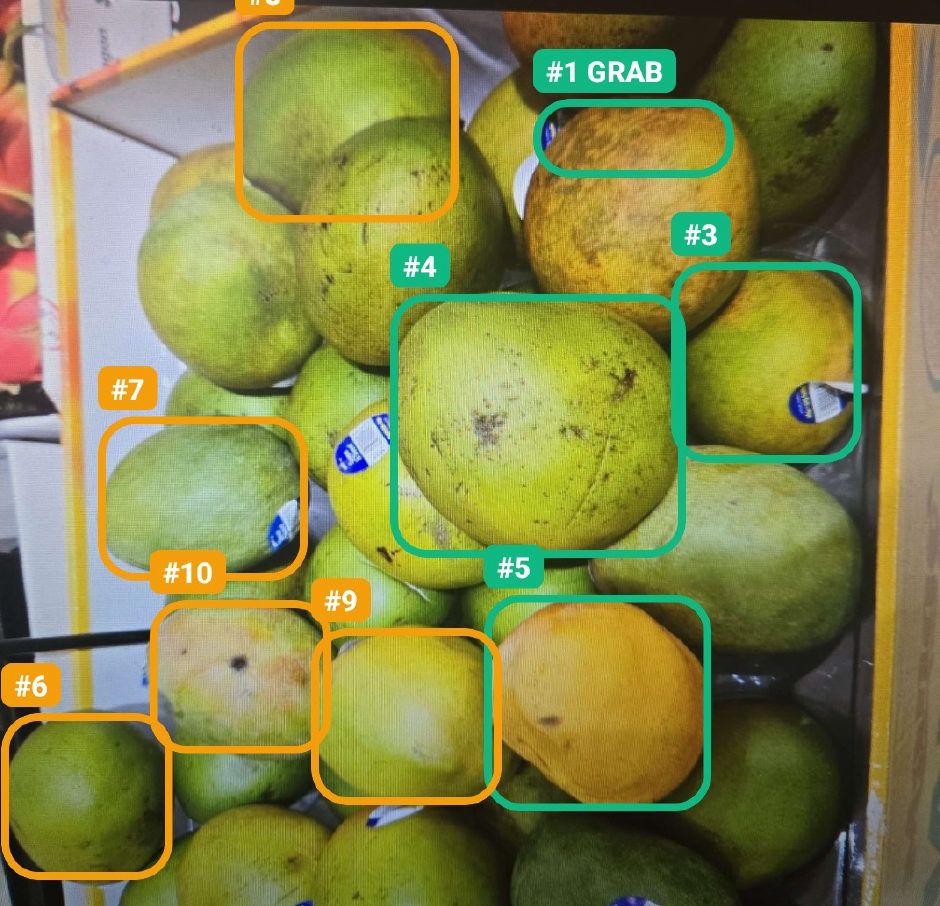
A real RIPE scan of a crate of mangoes: nine numbered rings drawn on individual fruit, with GRAB marking the top pick.
Picked by RIPE ๐ŸŒฑ

An actual scan, not a mock-up. RIPE found ten mangoes, marked the nine it could place precisely, and put GRAB on its top pick. Every number comes with a reason in plain words, which matters most on fruit like mangoes, where colour depends on the variety and tells you far less than people assume.

Is it ripe? Check a photo, free.

One piece of produce, filling the frame, decent light. This checks one piece; the app reads a whole bin at once.

The app does this for a whole bin at once, then tracks it at home.

$19 for your first year
Early supporter price, for people who tried this before we launched.

Nothing is charged now and no card is taken here. We email you one link at launch, and the $19 first year is held for you.

Checking one is easy.
Picking the best of a full crate is the trick.

  • ๐ŸŽฏ
    Numbered rings on your own photo. Not a score out of ten. Marks on the actual fruit, so you can find them again in the bin.
  • ๐Ÿ“…
    Sorted across your week. It marks one for tonight and the ones a few days behind it for later, so the whole bag does not ripen on the same afternoon. For fruit that never ripens after picking, like melons and grapes, it says so and tells you to buy ready.
  • ๐Ÿ’ฌ
    A reason you can check. "Buttery yellow field spot, matte rind." Look at the fruit and decide for yourself whether it is true.
  • ๐Ÿคฒ
    It admits what it cannot see. No firmness, no smell, nothing under the skin. Uniform bin? It says "grab any" instead of inventing a winner.
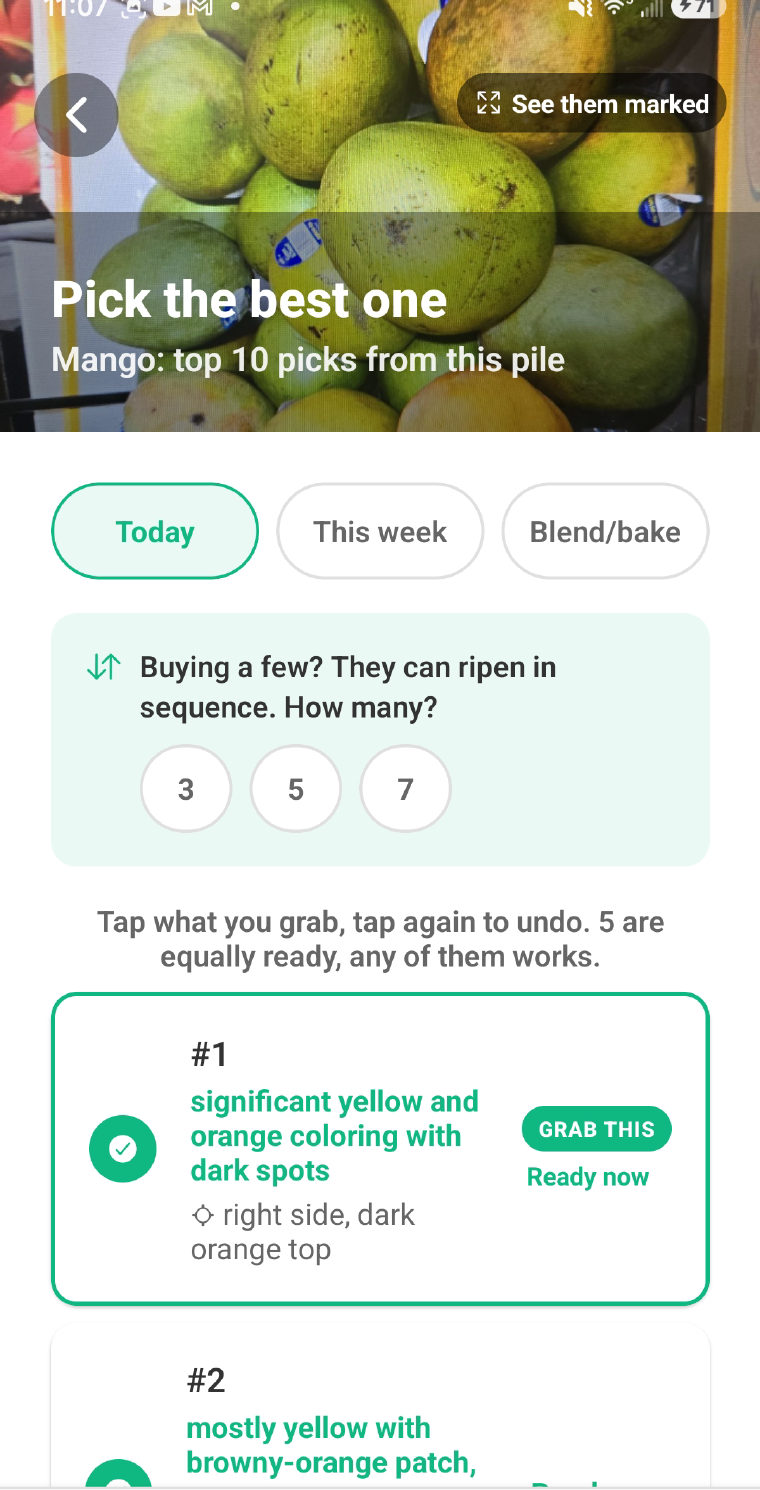
RIPE result screen: Pick the best one, mango, top ten picks from this pile, with GRAB THIS and Ready now on number one.
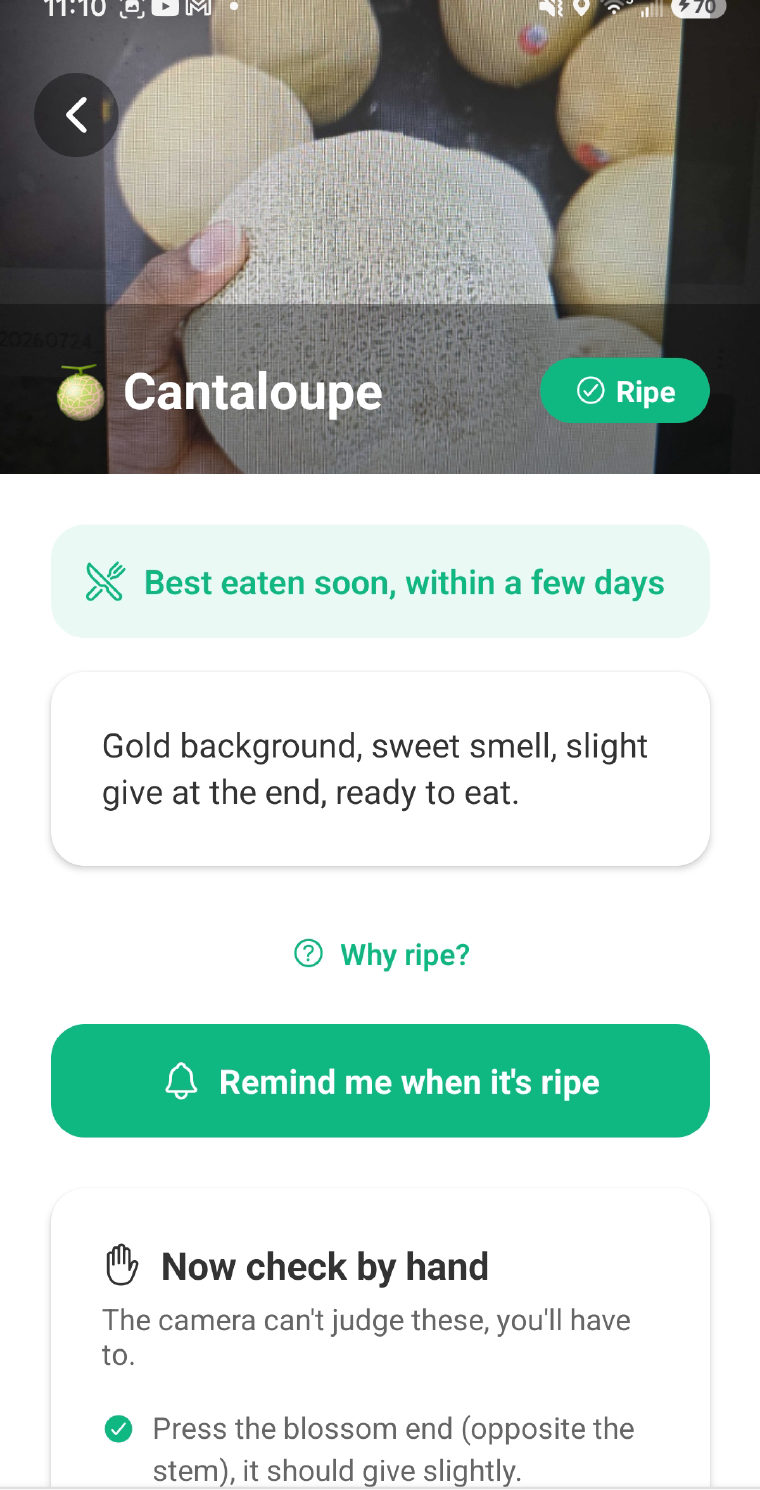
RIPE cantaloupe result: ripe, best eaten within a few days, and a Now check by hand section listing what the camera cannot judge.

It tells you what it can't tell you.

Every result ends with the part the camera cannot do. Not buried in settings, not a disclaimer at the bottom: a section called Now check by hand, with the two or three things your fingers and nose decide.

A cantaloupe gets "press the blossom end, it should give slightly." An avocado gets "cradle it in your palm, never fingertips." That is the deal: the camera reads the surface, you make the call, and nobody pretends a phone can feel firmness.

Scan the bin. Grab the best.
Eat it in time.

๐Ÿ“ท
Scan the bin

One photo of the display. The good ones come back ringed, numbered and dated.

โœ‹
Tap what you grabbed

Each one lands in My Kitchen and starts counting down to its ready window.

๐Ÿฝ๏ธ
Eat it at its peak

RIPE nudges you when it is ready, and again before it turns.

The avocados nobody knew
were already in the drawer

Most waste in a busy house is not a picking problem. It is that four people open the same fridge and nobody tells anyone anything. One shared view fixes it, and one subscription covers everyone.

  • You start a household. RIPE gives you a six-letter code.
  • They install and type six letters. That is their entire job. No setup, no settings, nothing to maintain.
  • Everyone sees the same fridge. What is in it, what is ready tonight, what needs eating first.
  • Only you pay. One subscription covers the shared kitchen for the whole house, however many of you there are.
YOUR HOUSEHOLD CODE
K7RQ2M
Text it to whoever shares your fridge.
๐Ÿฅ‘ Avocado ยท ready now ๐ŸŒ Bananas ร—5 ยท peak today ๐Ÿ“ Berries ยท eat first

The part that stops the tossing

๐Ÿงบ
My Kitchen
A live countdown: eat today, getting old, later this week. One tap to resolve.
๐Ÿ””
Ripeness alerts
A nudge when it is ready and before it turns. Ranges, never fake-precise days.
๐Ÿ›’
Smart list
Built from your own toss history: what you finish, and what to buy less of.
๐Ÿ†
Trophy case
Items rescued, and the dollars you did not throw away.

Scanning is free.
Premium stops the tossing.

One bad shop costs more than a year of this. A soft clamshell of berries, a bag of apples gone floury, two avocados that went from rock to brown overnight: that is twenty dollars in the bin on a single Thursday.

Free
$0
No account needed
Enough for a normal week's shopping
  • โœ“ 12 bin scans and 30 single checks a month
  • โœ“ Full My Kitchen with live countdowns
  • โœ“ Your first ripeness alert
  • โœ“ Trophy case and scan history

Shopping for a big household? Six bins in one trip is normal, so you will likely want Premium by your second shop. Better you know that now than at the till.

No ads. We do not sell your data. Cancel in your phone's settings, like anything else.

The questions worth asking

What happens when it gets one wrong?

It will be, sometimes. Internal bruising and mealy flesh are invisible from outside, and no camera changes that. So RIPE ranks the bin instead of certifying one piece, gives ranges instead of exact days, and ends every verdict by handing the last check to your hands.

Does it work in a real store?

On what a camera can see: colour, speckling, netting, sunken patches, and the field spot once you turn the melon over. Produce lighting is tuned to flatter whatever is under it, so RIPE leans on contrast cues rather than absolute colour, and it knows that shine on apples, peppers and citrus is usually wax rather than freshness. In the app, a photo too blurry, dark or glary to read gets refused rather than guessed at. Scanning needs a connection, so a true dead-zone aisle will not work; My Kitchen and your alerts keep working offline.

Which fruits and vegetables does it know?

It identifies most common produce and judges it on visible cues. Six are covered in real depth, with hands-on coaching written against a produce manager's cues: bananas, watermelon, cantaloupe, avocado, mango and peaches. Everything else gets a general read and a general hands-on check. More depth gets added as we go.

Do I have to make an account?

Not for the checker on this page, and not for the app either. Scanning, My Kitchen and your first alert all work with no signup. An account is only needed to share a kitchen with the people you live with, because your household has to be able to find you.

Does the free trial take my card up front?

Yes, and we would rather say so plainly. Google Play runs the billing, so a payment method has to be on your Google account before any trial can start, the same as every other Play subscription. Nothing is charged during the seven days, and cancelling before day seven costs you nothing.

What happens to my photos?

Reading a scan needs a connection: the photo goes to our AI provider, OpenRouter, which routes it to a vision model from OpenAI or Google, and comes back as a verdict. We do not store it. In the app, your scan photos stay on your device. The full detail is in our privacy policy.

I'm on an iPhone.

Android first, iOS after. The checker on this page works on any phone right now, so bookmark it and use it in the aisle. Leave your email below and you will hear when iOS is real, not before.
Pick like a pro,
no app required

Twenty short guides. No old wives' tales, and every cue is one you can check with your own hands.

All 20 produce guides โ†’

Stop paying for food
you end up throwing away.

RIPE is launching soon on Google Play, free. The checker above is yours right now, no account needed.

Google Play, launching soon
App Store, coming later

One email when RIPE hits Google Play. Nothing else, ever.